Hi guys, we are back to the series of Cybersecurity Ops with Bash: Defensive workshop solution.
Note: This is only workshop solution, NOT A SUMMARY OF DEFENSIVE BASH!!! I do not own the book, I am just reading/learning it and published the solution ONLY.
Before you read the workshop solution, it is good if you have read the Defensive chapter of the book, so it gives you an idea what the chapter is about.
Chapter 8
- Add an -i option to livebar.sh to set the interval in seconds.
The main point here is check for the option ‘-i’ . In order to do that, we will have to use an if-else statement to check for the option.
I modified the script to add in an if-else statement,
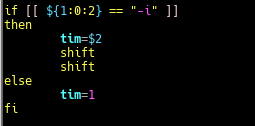
In this block of code, the if-else statement will check for the first argument that is parse to the script. If the first argument matches the option ‘-i’, the variable tim will take in the second argument as value to set the time interval in the script. If not, the variable tim is set to ‘1’ second.The next 2 lines of ‘shift’ to push out the first and second argument so that the next few arguments are parse correctly to the intended functions or variables in the script.

To set the time interval for each print. - Add an -M option to livebar.sh to set an expected maximum for input values. Use the getopts built-in to parse your options.
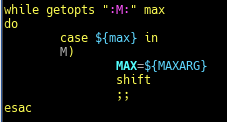
getopts set a list of letters/characters to be accepted, in this case “M:” . Each character if followed by a colon is expected to have an argument to follow up. For e.g. sh liverbar.sh -M 25 etc.
getopts built-in function is to process options in a more standardized and familiar way. - How might you add an -f option to livebar.sh that filters data using grep?What challenges might you encounter? What approach(es) might you take to deal with those?
Ans: Create a function to solve ‘-f’ option to filter data using grep. The issue will be how to send the line of text over to the next bash script which is then parse to be filter off the unwanted data. Thus, the approached I took, was to append it to another log file and have my livebar.sh to read the log.file and use grep command and wc command to filter off the data and find the number of occurrence.
The result…
In looper.sh, the code I changed is…
And the interval as well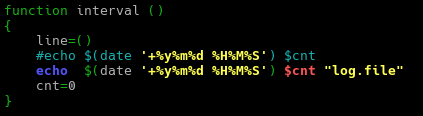
The log.file is passed as an argument to be read by the livebar.sh
In livebar.sh, the code I modified is…
To check for the option ‘-f’, if matched then parse the log.file to the function regex to filter off unwanted data.
In the regex function….
It takes in the user requested regular expression and based on that to filter off the data in the log.file followed by printing out the bar graph. - Modify wintail.sh to allow the user to specify the Windows log to be monitored by passing in a command-line argument.
I changed the “Application” to “$1” to pass in a command-line argument.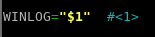
- Modify wintail.sh to add the capability for it to be a lightweight intrusion detection system using egrep and an IOC file.
due to my lack of knowledge, the solution I provided may not be the best but if there are better solution pls feel free to leave a comment behind.
- Consider the statement made in “Command-Line Buffers”: “When the input is coming from a file, that usually happens quickly.” Why “usually”? Under what conditions might you see the need for the line-buffering option on grep even when reading from a file?
Ans: It is because the data in a file is fixed, thus even if the buffer is partially filled or no incoming data is being appended to the file, it signify as the command has reached the end of the file which lead to the output of the content of the buffer.
However, that is not the case for grep command to be reading data of a “real-time” file for e.g. access.log from a pipe, where events happen periodically. Thus, having to wait for the buffer to be full to be able to output the content. Hence, under this circumstances line-buffering option comes into play to output the data once a match has been found.
Hope you have a nice day and that this solution will help you in the journey of bash scripting.
Author: Derek
 Bs&Derek