Hi guys, we will be continuing the series of Cybersecurity Ops with Bash: Defensive workshop solution. I will be going through Chapter 7: Data Analysis.
Note: This is only workshop solution, NOT A SUMMARY OF DEFENSIVE BASH!!!
Note: I do not own the book, I am just reading/learning it and published the solution ONLY.
Before you read the workshop solution, it is good if you have read the Defensive chapter of the book, so it gives you an idea what the chapter is about.
Chapter 7
- The following example uses cut to print the first and tenth fields of the access.log file:
$ cut -d’ ‘ -f1,10 access.log | bash summer.sh | sort -k 2.1 -rn
Replace the cut command with the awk command. Do you get the same results? What might be different about those two approaches?
The answer:
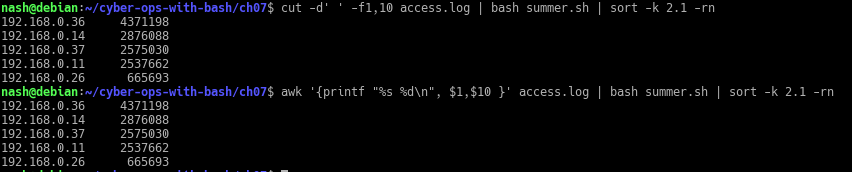
Yes, I was able to get the same result through 2 different commands. The cut command takes every space as a separator, which is why it is important to state the option ‘-d’ to identify the separator. Whereas for awk command, it is a flexible program that only splits on the sequence of whitespaces between 2 string value and each string value is a field on its own.
- Expand the histogram.sh script to include the count at the end of each histogram bar. Here is the sample output:

In the pr_br function, add the following code after the for loop:

Basically, it is to print out the number of occurrence an IP address appeared, the value was stored in ‘$raw’. Thus, using printf function to print out the value of ‘$raw‘.The output is …

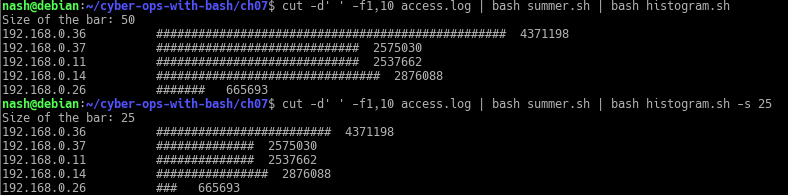
- Expand the histogram.sh script to allow the user to supply the option -s that specifies the maximum bar size. For example, histogram.sh -s 25 would limit the maximum bar size to 25 # characters. The default should remain at 50 if no option is given.
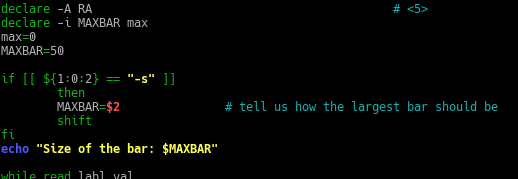
In the code, add an if-else statement to check for the option ‘-s’ and take in the value after ‘-s’.
The output is…
- Modify the useragents.sh script to add some parameters
- Add code for an optional first parameter to be a filename of the known hosts. If not specified, default to the name known.hosts as it currently is used.
Answer:

The first command line shows user specified the filename of known hosts and passed it as an argument to the script ‘useragents.sh’. It shows the number of host specified based on the file.The second command line shows the result of user not specifying the filename of known hosts, thus the script ‘useragents.sh’ uses known.hosts as a default file to be passed as an argument. It shows that the number of host based on the default file, known.hosts.
In the code, I modified it…

To check for option ‘-h’, if condition matched, use the file that user specified, if not use the default file ‘known.hosts’ - Add code for an -f option to take an argument. The argument is the filename of the logfile to read rather than reading from stdin.
The result…

The first commmand line shows, user specify the option ‘-f’ to read the log file and the result was returned to the user. However, the second command line shows the user not specifying the option ‘-f’ to read the log file, thus, receiving an error message stating ‘No logfile being inputted‘
- Add code for an optional first parameter to be a filename of the known hosts. If not specified, default to the name known.hosts as it currently is used.
- Modify the pagereq.sh script to not need an associative array but to work with a traditional array that uses a numerical index. Convert the IP address into a 10- to 12-digit number for that use. Caution: Don’t have leading zeros on the number, or the shell will attempt to interpret it as an octal number. Example: Convert “10.124.16.3” into “10124016003,” which can be used as a numerical index.
The result…

The code…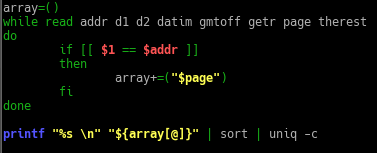
- ‘array=()‘ to state the variable as an array.
- ‘if [[ $1 == $addr ]]’ check if the ip address stated matches
- If so, then add the relevant element into the array.
- print out the elements in the array, sort it and count the number of occurrences of the same element.
That’s comes to the end of Chapter 7 of Defensive Bash. Hope you are able to pick up something from this post and have a nice day 🙂
Author: Derek
 Bs&Derek