Hi guys, we will be continuing the series of Cybersecurity Ops with Bash: Defensive workshop solution. I will be going through Chapter 6: Data Processing.
Note: This is only workshop solution, NOT A SUMMARY OF DEFENSIVE BASH!!!
Note: I do not own the book, I am just reading/learning it and published the solution ONLY.
Before you read the workshop solution, it is good if you have read the Defensive chapter of the book, so it gives you an idea and skills on how to write bash script.
==============================================================
Chapter 6
- Given the following file tasks.txt, use the cut command to extract columns 1 (Image Name), 2 (PID), and 5 (Mem Usage).
Given the tasks.txt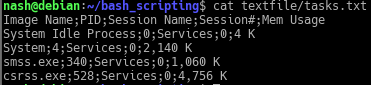
The criteria to extract out column 1,2,5. Using cut command the common delimiter to identify the columns is “;”. So the cut command is…
- Given the file procowner.txt, use the join command to merge the file with tasks.txt from the preceding exercise.
Given procowner.txt
The join command is used to join 2 files together given if both files have one column of common values, in this case is the ‘PID’ column. Thus, the answer is…
The option ‘-t’ to use a CHAR as the field separator in this case is ‘;’ as field separator. The following options like ‘-1’ and ‘-2’ is to specify the field to join on between 2 files. - Use the tr command to replace all of the semicolon characters in tasks.txt with the tab character and print the file to the screen.

Basically, using tr command to translate the all the semicolon ‘;’ to horizontal tabs ‘\t’. - Write a command that extracts the first and last names of all authors in book.json.
The answer is…
The jq command is a cli JSON processor, the ‘.’ is simplest json data filter.Given ‘.authors[].firstName’, the ‘.authors[]’ is an object array followed by ‘.firstName’ which is another object in the array of ‘authors’.
Basically, when JSON object ‘book.json’ is inputed, the json processor will produce the value of ‘firstName’ which belongs to an array called ‘authors’.
We have come to the end of Ch. 6 workshop solutions, I will be posting more solutions in the coming days. Hope you have a nice day 🙂
Author: Derek
REFERENCES:
 Bs&Derek